 Matt の 小天地
5 分鐘帶你了解 LLM QA Bot
5 分鐘帶你了解 LLM QA Bot
最簡單的架構
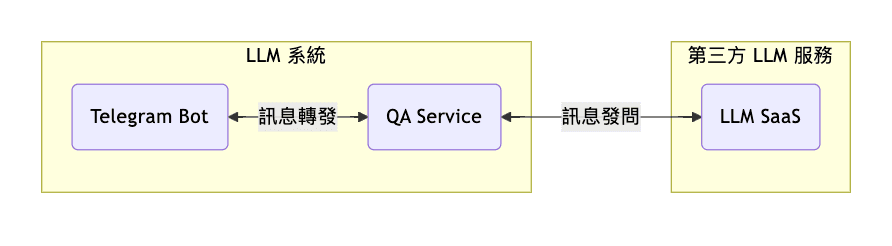
可以用任何第三方 interface 介接,這邊以 Telegram Bot 為例
透過 TG 作為介面,在裡面埋一個 TG-Bot 作為訊息接收的 interface
這樣系統架構會接信下面這樣
而其中 QA Service 對 LLM SaaS 的 訊息發問 中,至少會需要附帶 System Prompt & User Prompt 兩個訊息
使用 LLM SaaS 的幾個基礎
- System-Prompt & User Prompt
- system-prompt 主要用於
define 問答的 Scope - User Prompt 則是針對這個 Scope 的提問
- system-prompt 主要用於
- structured output 定義 output 必須要的結構,適用於 output 的資料需要做額外處理
- function calling
給予 LLM 工具箱,讓他有能力
決定要執行哪個 function
System-Prompt 的資料膨脹
隨著越來越多資訊想放入 QA-Bot, System-Prompt 的膨脹是一定會面對到的問題
而我們都知道,雖然 LLM 的 Context 可以一次提供 1M 甚至更多的 Token
但現階段的 LLM 由於 注意力機制 的問題,LLM 對於 Long Context 會更傾向於只關注開始與結尾的訊息,因此對完整細節的資訊獲取能力會下降
為了解決這個問題,我們會開始為整個大的 System Prompt 劃分知識區塊
拆成更小的 知識框架
知識區塊取得
當我們成功劃分好知識區塊之後,我們該怎麼讓使用者提出 User Prompt 的時候,可以給 LLM 對應知識區塊的 System Prompt 呢?
這邊給出兩種參考方式 function calling, RAG
RAG
RAG 是一種把資料向量化並且使用這些向量資料的技術
RAG 有幾個重點,向量相似度, embedding model, tokenizer
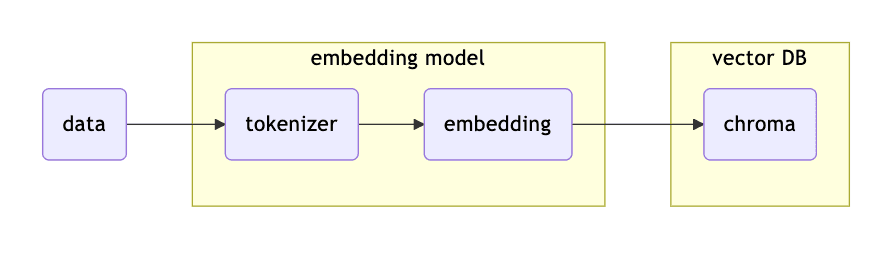
在資料向量化的過程大概如下
 餵進來的
餵進來的 data 會先經過 embedding model 做 tokenize
之後再針對這些 tokenize 後的 context 做 embedding
什麼是 embedding 呢?
embedding 就是一種把 文字 轉換成 [ 0 , 1 ] 的過程
而 0 跟 1 才是機器碼能識別的內容,進而才有辦法去做 Similarity
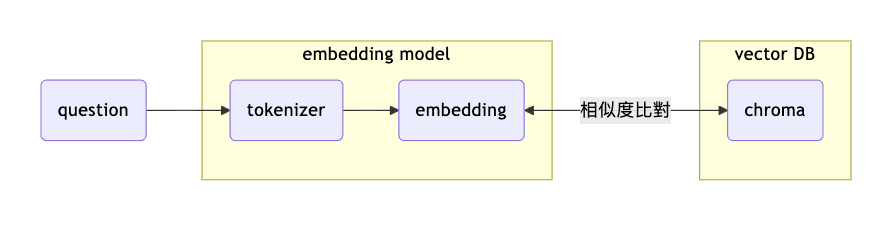
而資料在比對的過程大概如下
 在上面這個流程呢
我們的
在上面這個流程呢
我們的 question 還是會經過 embedding model 做 tokenize & embedding 產出屬於 question 的 0 跟 1 的資料(以下簡稱 data-q)
接著,再把 data-q 丟到向量資料庫 chroma 做向量的 similarity
從向量資料庫找到相似度最高的資料(以下簡稱 data-doc)
接著我們就可以把找到的 data-doc 與 question 整合後提供給 LLM 來幫我們產生回覆
Function calling
Function calling 是 LLM 的一種特別用法
透過 define 好 LLM 可以使用的工具
讓 LLM 可以 決定 他要運行哪一個 Function ,並且還可以取得 Function 的 Params
這邊參考 OpenAI 官方對於 function calling 的文件
簡易演示什麼是 function calling
ref: link
# input
from openai import OpenAI

client = OpenAI()

tools = [{
    "type": "function",
    "name": "get_weather",
    "description": "Get current temperature for a given location.",
    "parameters": {
        "type": "object",
        "properties": {
            "location": {
                "type": "string",
                "description": "City and country e.g. Bogotá, Colombia"
            }
        },
        "required": [
            "location"
        ],
        "additionalProperties": False
    }
}]

response = client.responses.create(
    model="gpt-4.1",
    input=[{"role": "user", "content": "What is the weather like in Paris today?"}],
    tools=tools
)

print(response.output)
// output
[{
"type": "function_call",
"id": "fc_12345xyz",
"call_id": "call_12345xyz",
"name": "get_weather",
"arguments": "{\"location\":\"Paris, France\"}"
}]從 output 的結果可以看到
他可以決定要執行的 function 以及相關必要的 params
因此,我們可以把上面的 code 稍微調整一下
# input
from openai import OpenAI

client = OpenAI()

tools = [{
    "type": "function",
    "name": "gke_cluster_info",
    "description": "Get current cluster monitoring info.",
    "parameters": {
        "type": "object",
        "properties": {
            "product": {
                "type": "string",
                "enum": [
                    "bbin",
                    "bbgp"
                ],
            },
            "group": {
                "type": "string",
                "enum": [
                    "outside",
                    "inside"
                ],
            },
        },
        "required": [
            "product",
            "group"
        ],
        "additionalProperties": False
    }
}]

response = client.responses.create(
    model="gpt-4.1",
    input=[{"role": "user", "content": "現在 bbin outside 的情況?"}],
    tools=tools
)

print(response.output)
在上面的例子,我們進一步透過 enum 進一步限制可用參數
因此,我們可以讓 gke_cluster_info 在 process 更清楚知道要到哪個 gke-clsuter 去取資訊